How to use the price calculator: a pool pump example
A practical pool pump example: how to use the Price Calculator to compare a random timer, a cheapest-hours schedule, and smart Smart Kilowatts control.

A pool pump is a good example because it often uses a fair amount of electricity, but it does not always have to run around the clock. If roughly 14 hours per day is enough for water filtration, the next question matters: which 14 hours should you choose?
In this example we will use the Smart Kilowatts price calculator. It lets you compare different scenarios using historical prices instead of guessing: a simple timer, a better selected manual schedule, and smart control.
Before you start: how the cheapest-hours search helps
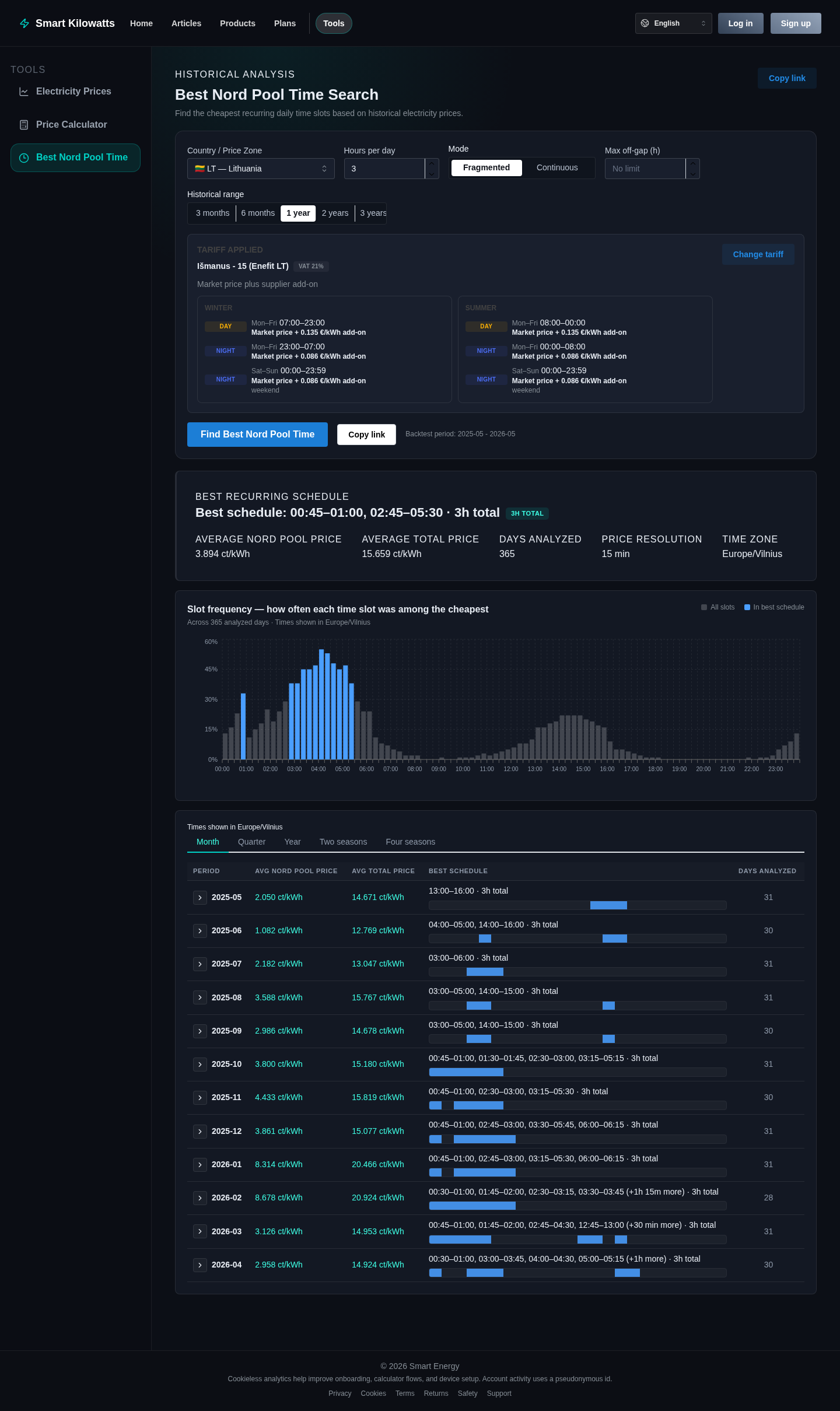
If you have not read the previous guide yet, it is worth starting with the article Which hours are cheapest?. There we explain how the Cheapest Hours Search Tool uses historical Nord Pool data to find the hours that were usually cheap.
That tool is especially useful when you want to use a simple mechanical or electronic timer. The Price Calculator goes further: it lets you check how much such a schedule would have cost and how much it would have saved compared with smarter control.
1. Describe the pool pump rule
First we describe the device itself in the calculator. In this example it is a pool pump with a power of about 400 W. In the rule we set that the device must run for 14 hours per day, but only during the months when the pool is actually used.
We also set a maximum electricity price limit of 28 cents per kilowatt-hour. If the price is above that limit, the pool pump stays off, even if that means it runs slightly less than the planned 14 hours on that day.
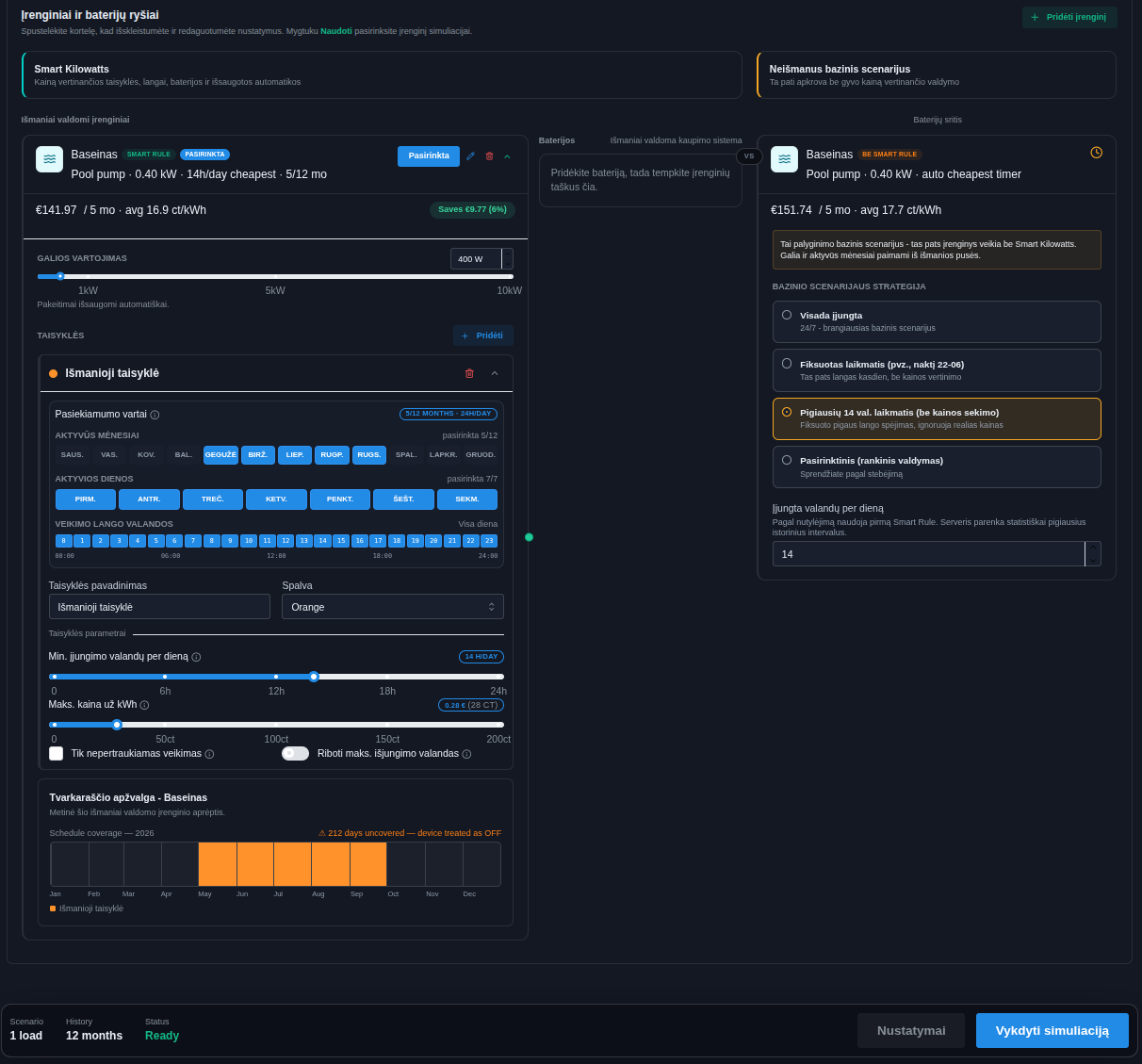
After signing up, this setup can also be created automatically with the AI wizard. Or you can use one of the links below: it opens a preconfigured simulation directly, so all that remains is to press “Run simulation”.
The selected months, weekdays, and operating window matter because the calculator does not calculate abstract theory. It evaluates exactly the period when the device could run according to your rule. The year overview at the bottom helps you see whether any months were left uncovered.
2. Choose what to compare against
On the right side you choose the baseline scenario. This answers the question: what would happen if we did not use Smart Kilowatts?
Several options are available: device always on, fixed timer, manual cheapest-hours timer, or custom hours. This way the calculator can show not only the total cost, but also the real difference between choices.
3. Random timer: saves money, but leaves a lot of room for a better schedule
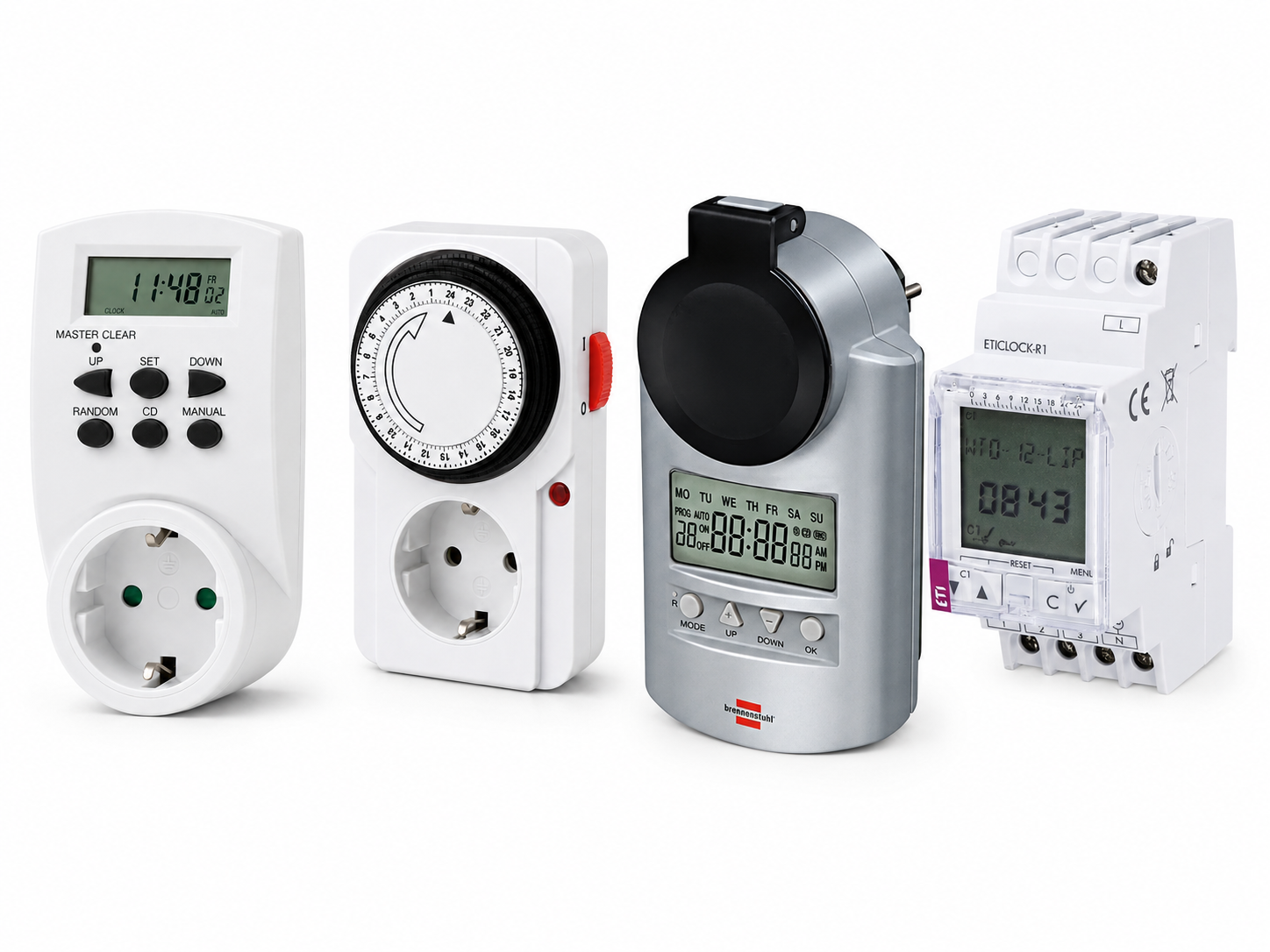
A common first attempt is simple: turn the timer on at night or choose a time by intuition. That can already reduce the bill, especially if the night tariff is lower. Compared with such a random or primitive timer, the smart scenario looks most advantageous: in this example Smart Rules saves about EUR 49.52, because the baseline schedule was not selected from the best historical intervals.
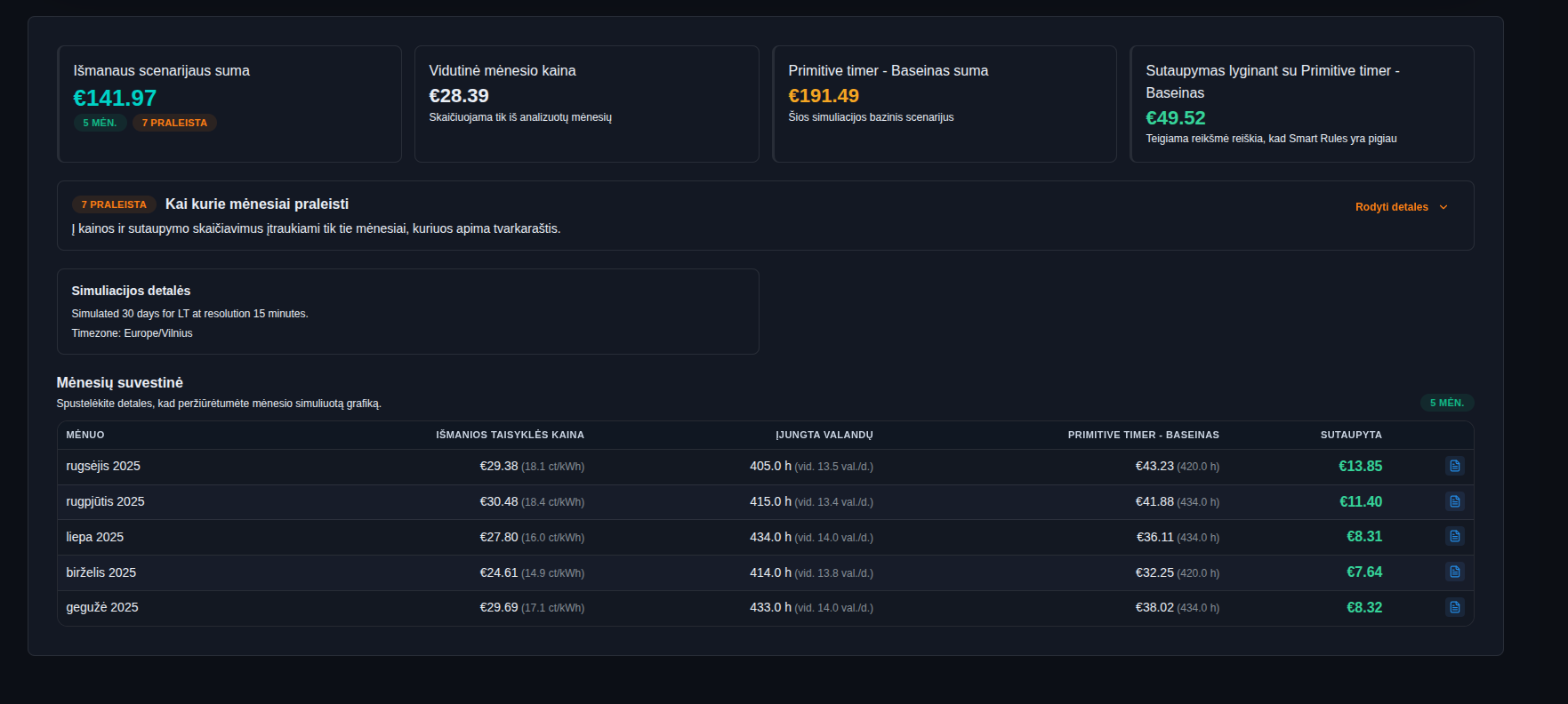
What does this result mean in plain language? If last year you had a pool with a 400 W filtration system, paid for electricity under a smart tariff, and set a timer to a non-optimal period, this single device could have cost you about EUR 49.52 more over the year.
You can open this simulation using this link.
This does not mean a simple timer is bad. It can be a good first step. The problem is different: if we choose the time by intuition, it is hard to know how much money we are still leaving on the table.
Now let us try choosing a better operating period:
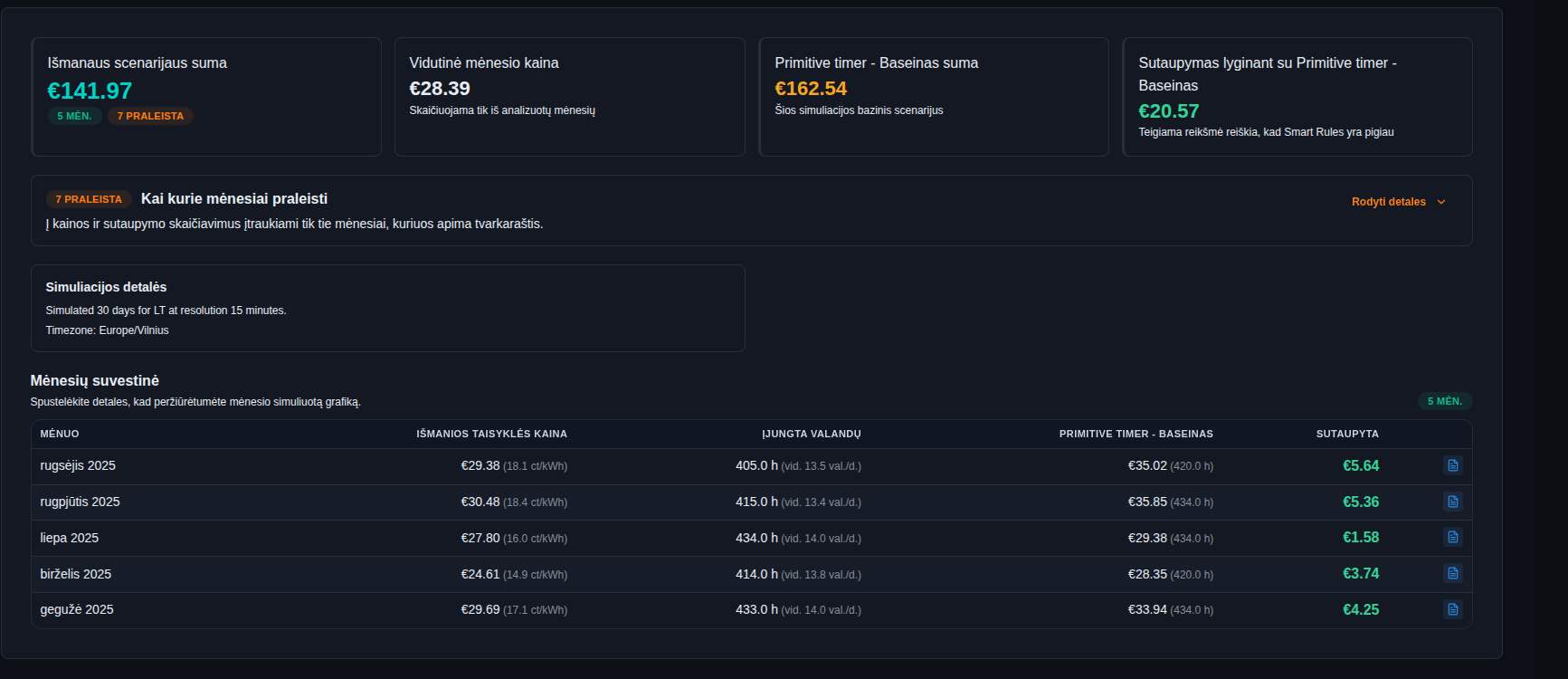
As we can see, the result improved in this case: the difference between the smart scenario and the mechanical timer fell to EUR 20.57.
You can reproduce this simulation using this link.
This comparison shows the main point: even a randomly selected timer can help, but it is often not optimal. If the schedule misses the cheapest intervals or ignores seasonality, smart control has more room to save.
4. Better manual schedule: cheapest-hours timer
The next step is to stop guessing. With the Cheapest Hours Search, you can find which 14 hours were historically cheapest most often. You can then transfer that schedule to a simple timer.
When the baseline scenario is already a manual cheapest-hours timer, the difference between it and Smart Rules becomes smaller. That makes sense: a well-chosen timer is already much better than a random schedule. In this example, the manual cheapest-hours timer costs about EUR 151.74, while the smart scenario costs about EUR 141.97, leaving about EUR 9.77 in additional savings.
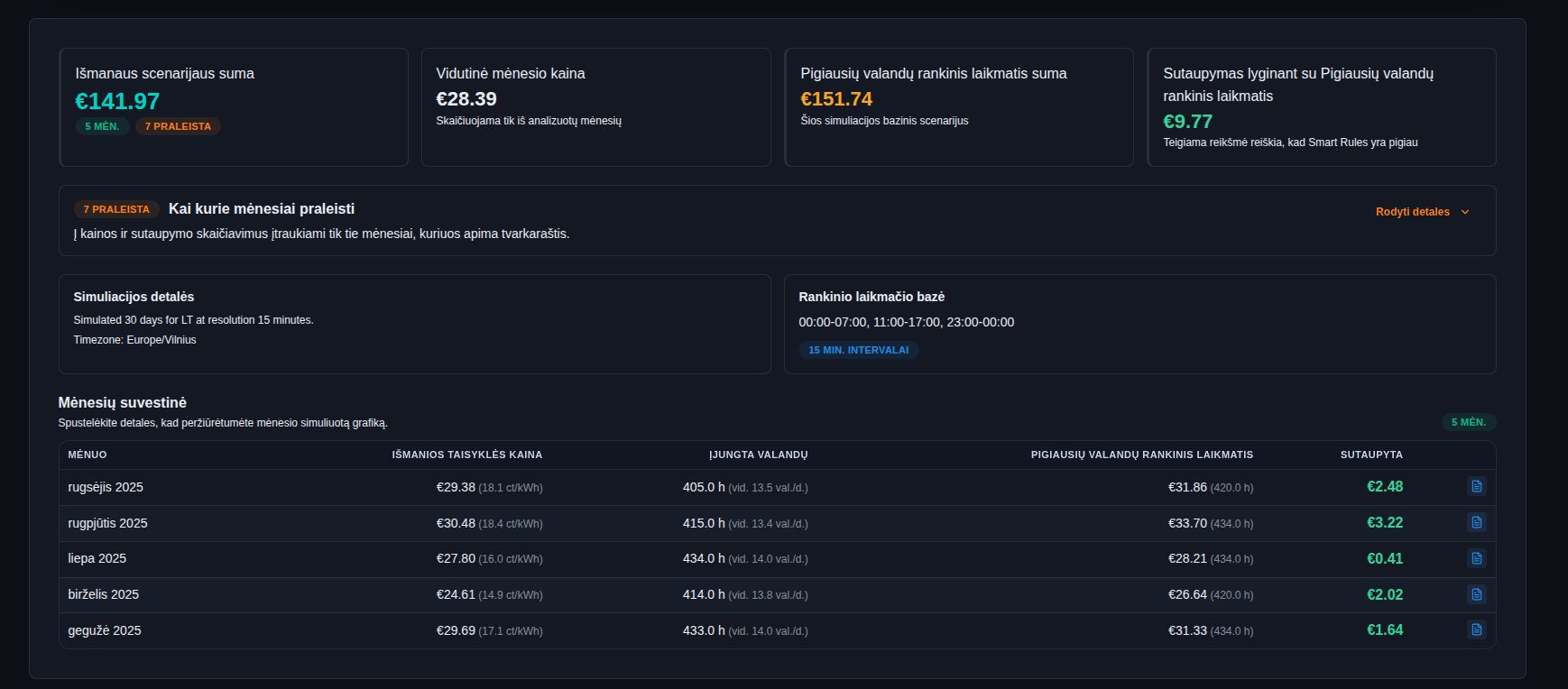
This is an important interpretation: if we compare Smart Kilowatts with a poor random timer, the savings look large. If we compare it with a well-chosen cheapest-hours timer, the savings are smaller, but the comparison is fairer.
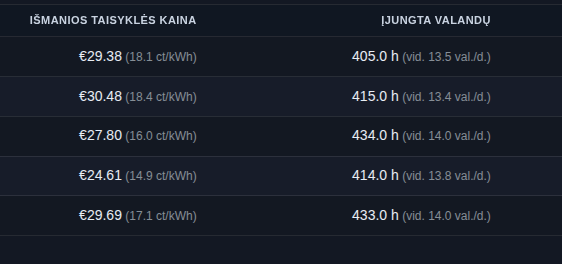
As we can see, the average price, including the Enefit “Išmanus 15” plan and VAT, is about 15-18 cents per kilowatt-hour. That is a solid result considering the fixed 12 ct daytime and 9 ct nighttime tariff add-ons (+ VAT) on top of the Nord Pool price.
Part of the savings also comes from the fact that the pool filter did not always run exactly 14 hours per day. In some months, for example August and September, the pool pump averaged about 13.4-13.5 operating hours per day. That happened because of the price cap we set earlier in the smart rule: 28 cents per kilowatt-hour.
5. Smart control: extra savings beyond a good manual schedule
On the smart scenario side, Smart Kilowatts knows the rule: the pool pump must run 14 hours per day only during active months. The system can then choose cheaper intervals based on real prices instead of one schedule set for the whole year.
Here it matters what we compare against. Against a poorly chosen fixed timer, the difference in this example is about EUR 49.52. Against a better chosen fixed schedule, it falls to about EUR 20.57. Against a manual cheapest-hours timer, about EUR 9.77 of additional savings remains, because the manual schedule is already a fairly good solution.
This is not a promise about the future, but it is a good way to understand whether a specific device is worth automating. The more the device consumes, the longer it runs, and the more flexible its operating window, the more useful it is to check the numbers in the calculator.
The note about skipped months means that only the months covered by the rule were included in the calculation. For a pool pump this is logical: winter months, when the pump is not used, should not distort the result.
You can reproduce this result here.
6. Check the details before sharing the result
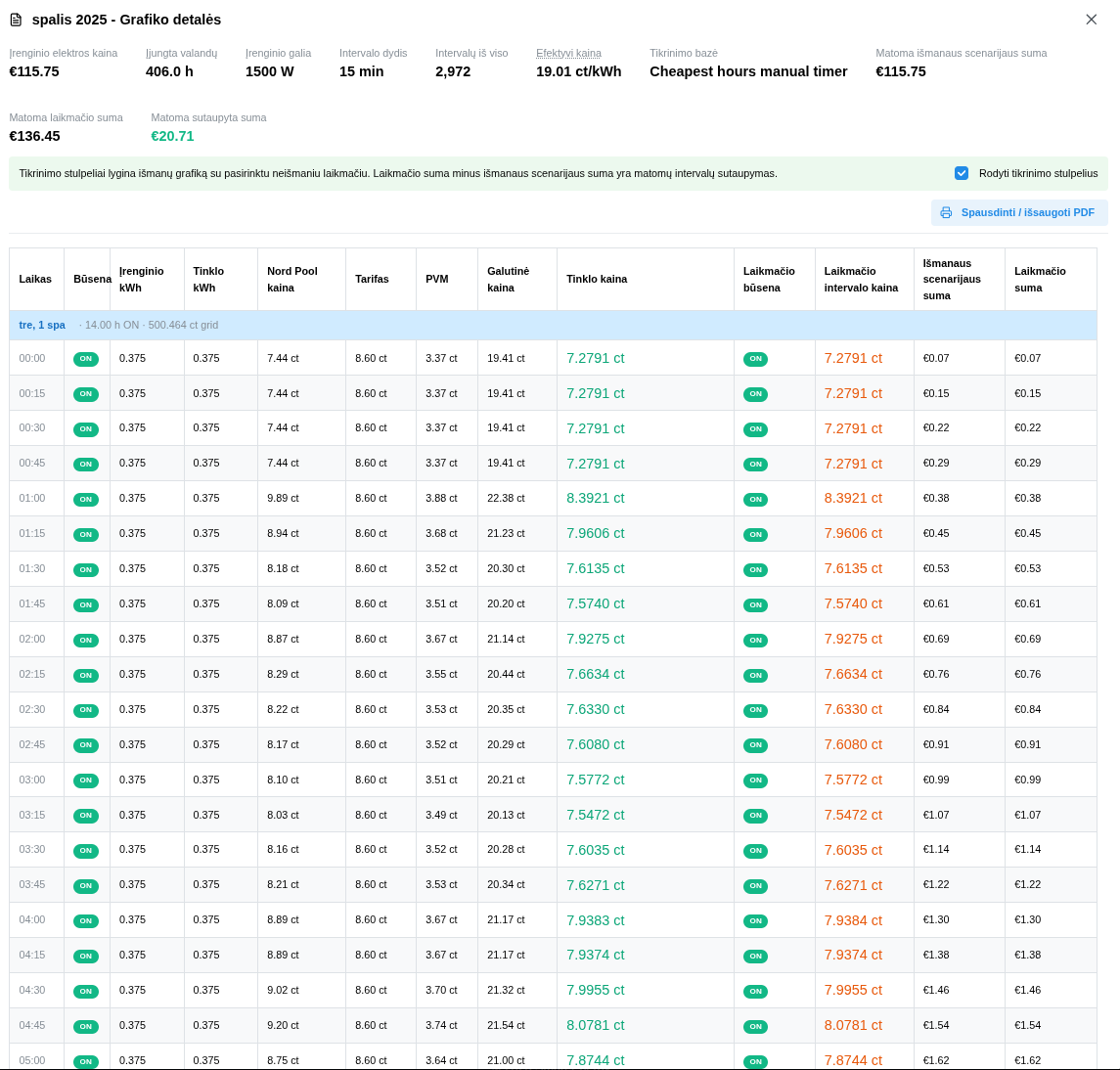
Opening the monthly details shows an interval report. Here you can see device state, price, timer state, and check columns that show how the total is formed.
This view is useful when you want to understand not only the final number, but also the calculation logic. If you plan to explain the decision to family, a customer, or yourself a few weeks later, the report helps confirm that the scenario really means what you think it means.
What to do next
If you want to repeat this example, you can open the prepared pool pump calculator setup. Change the power, months, and number of hours for your own device.
If you want to start with a simple timer, first open the Cheapest Hours Search and find a good manual schedule. If you want the schedule to be recalculated automatically based on tomorrow's prices, review Smart Kilowatts products and plans.
Most importantly: automate only devices that are safe to turn off and back on. Check manufacturer instructions, electrical power, hygiene limits, and comfort limits.
Related setups
-
Open the pool pump example
Prepared price calculator setup with a pool pump.
-
How the cheapest-hours search works
Previous article about historical Nord Pool data and timers.
-
Find the cheapest hours
Open the cheapest-hours search for a 14-hour scenario.
-
Products
Smart Kilowatts equipment for automatic control.
-
Plans
Subscriptions for automatic rules and control.