Nord Pool prices by email: why it is worth getting tomorrow's prices every day
What Nord Pool prices are, how a daily email helps plan electricity use, and how the Smart Kilowatts dongle shows the next 30-120 minutes of prices on its screen.
Nord Pool exchange prices have already become a daily reference point for many consumers in Lithuania, Latvia, Estonia, Finland, and Sweden.
If you use a dynamic plan, tomorrow's hourly prices become a practical plan for the day: they help you decide when to charge a car, heat water, run a pump, or schedule other flexible household tasks.
What is the Nord Pool price?
Nord Pool is an electricity exchange where next-day hourly electricity prices are set for each price area. Lithuania's area is marked LT, Latvia's LV, Estonia's EE, and in Scandinavia you will often see areas such as SE1, SE2, SE3, SE4, or Finland's FI.
The price changes with supply and demand. When there is plenty of wind, solar, or hydro power and consumption is lower, some hours can be cheaper. When consumption is high, generation is more expensive, or import capacity is limited, the price rises.
Why is it worth seeing prices every day?
Tomorrow's prices are usually published in advance, so you have time to prepare. A private home often has more flexibility than it seems at first glance: laundry, the dryer, dishwasher, water boiler, or EV charging can be moved to a cheaper hour without any discomfort.
Sometimes a small decision is enough. If you can start dinner or a larger baking job an hour earlier or later, the turkey in the oven will not suffer, while the monthly bill may go down. The same applies to household chores: one washing-machine or dryer hour in a cheaper interval is not a major life change, but over time it becomes a habit that pays off.
It is worth checking prices every day not so that the whole day revolves around electricity, but so that you can quickly spot clear windows. When prices are similar, you change nothing. When a cheap interval is clear, you can use it.
What will you see in the email?
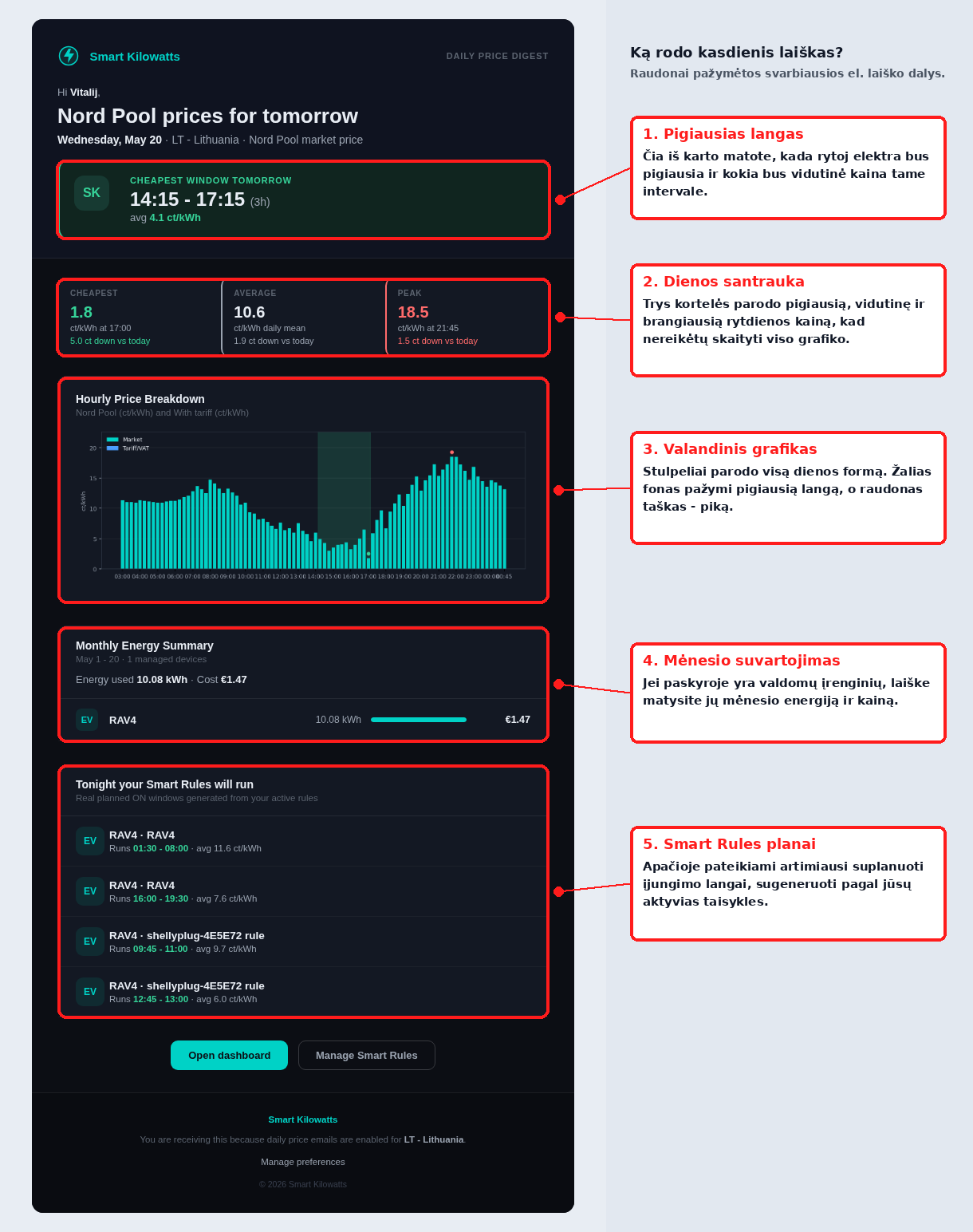
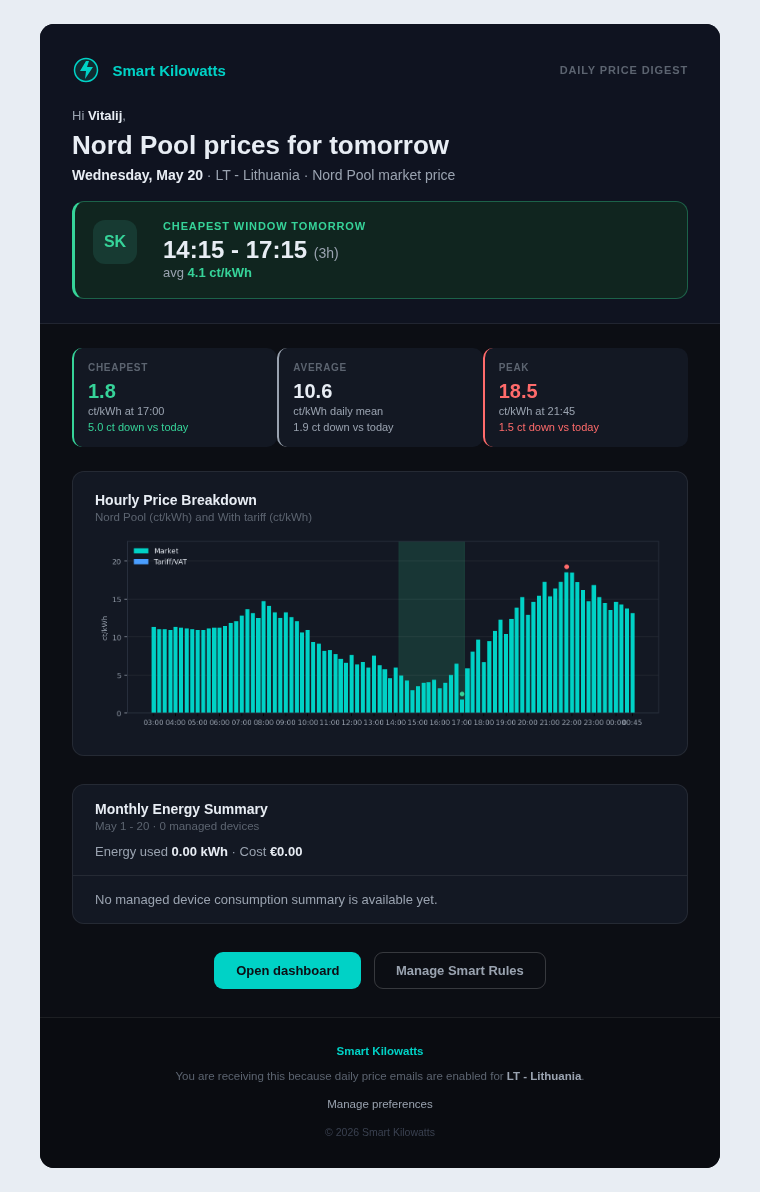
The Smart Kilowatts daily email first shows the date, country or price area, and tomorrow's cheapest window. At the top you see a short answer for when it is worth planning consumption, and below that the cheapest, average, and most expensive price of the day.
The hourly chart lets you see the full shape of the day: where the price drops, where the evening peak begins, and whether it is worth moving tasks by just one hour. If you have your own tariff in the account, the email can show not only the exchange price, but also a price closer to your final bill, including tariff and VAT.
If you have a Smart Kilowatts dongle and controlled devices, the email becomes an action summary: you will see monthly energy and cost summaries by device and the planned Smart Rules on-windows. If you do not have devices yet, the email is still useful as a price map, but it will not include controlled-device consumption or rule summaries.
Why is an email subscription convenient?
An email does not require a separate app or a daily login. You receive prices where you already read important messages, and you can return to the email later on your phone or computer.
The most convenient part is that the decision can be made in a few seconds. You see the cheapest window, compare it with your schedule, and decide whether it is worth doing laundry, baking, charging the car, or leaving everything as usual today.
Next step: on the dongle screen
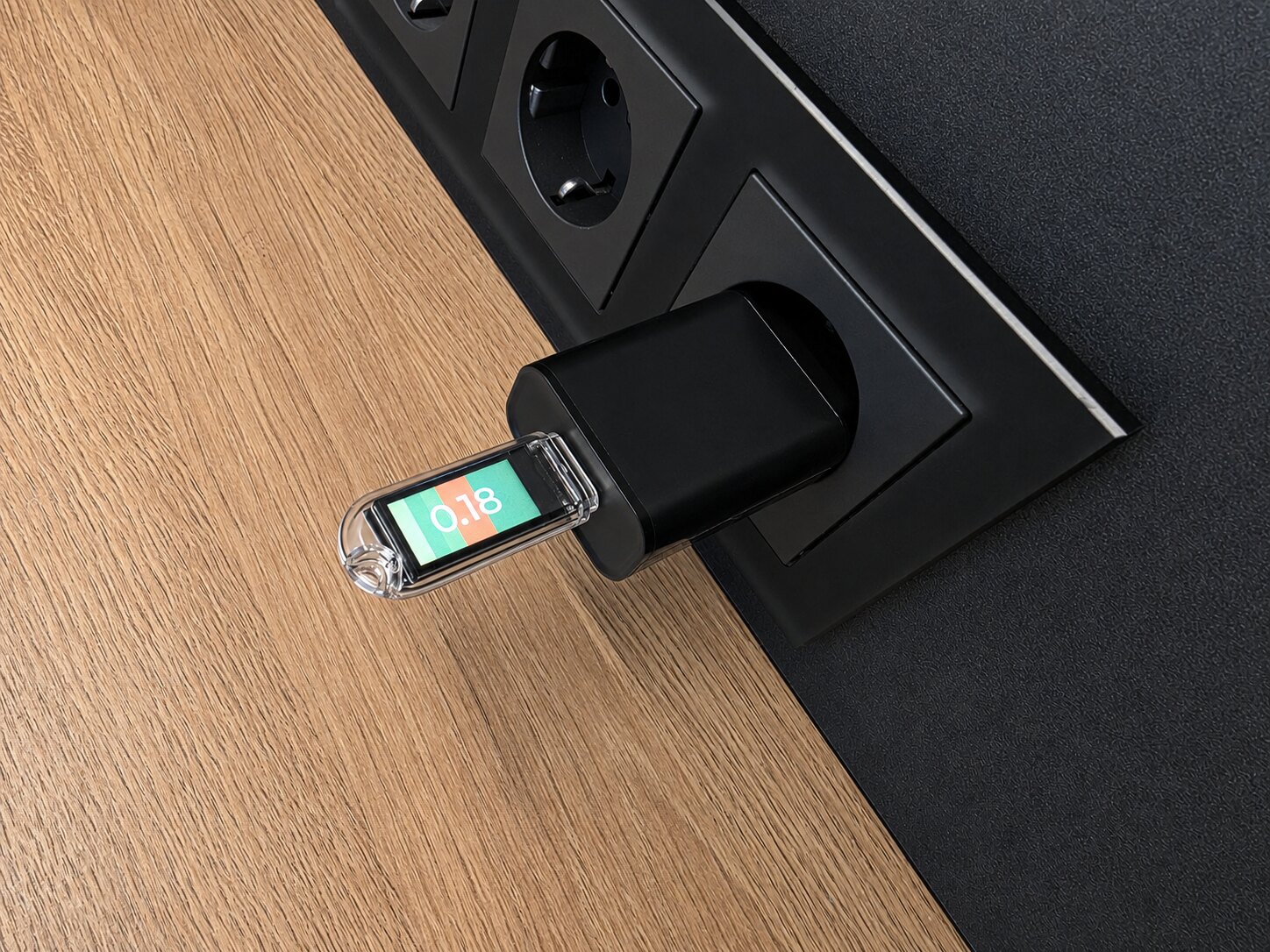
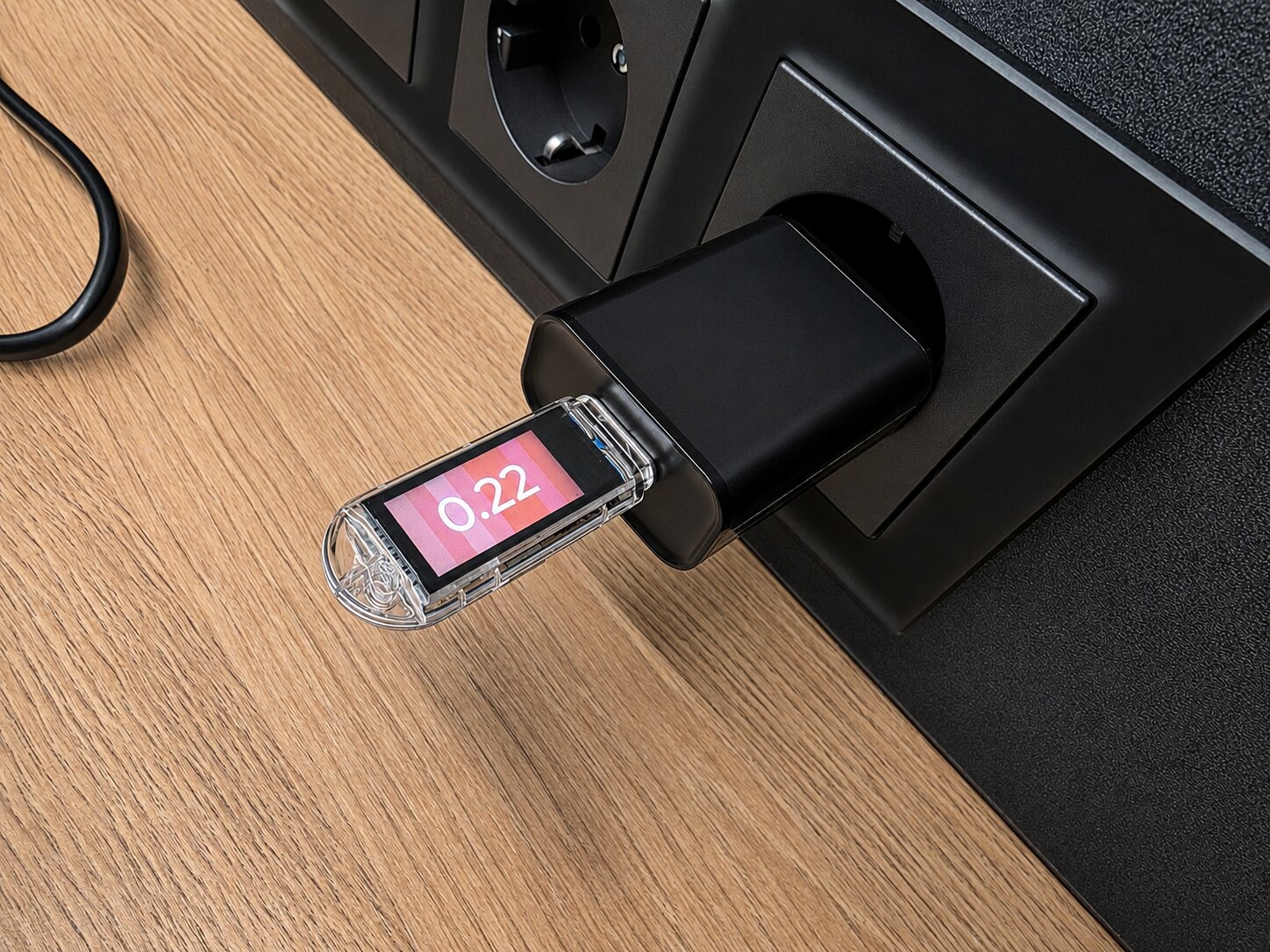
If you want to see prices not only in an email, the Smart Kilowatts dongle helps turn them into a signal that is always visible at home. The screen shows the current price, while background stripes show the direction of prices over the next 30-120 minutes. That means you do not need to open a chart every time you stand next to the washing machine, oven, or car charger.
Greener stripes mean a more favorable time, while redder stripes mean the price is rising or a more expensive interval is approaching. In practice, it works as a simple reminder: if you see a cheap window, it is worth starting now; if the background shows prices rising, it often pays to wait 30, 60, or 90 minutes.
The dongle is especially useful when you want to go one step beyond the email but do not yet want to automate everything. It shows the price where you make household decisions, and later the same account can be extended with Smart Rules automation.
How do you subscribe?
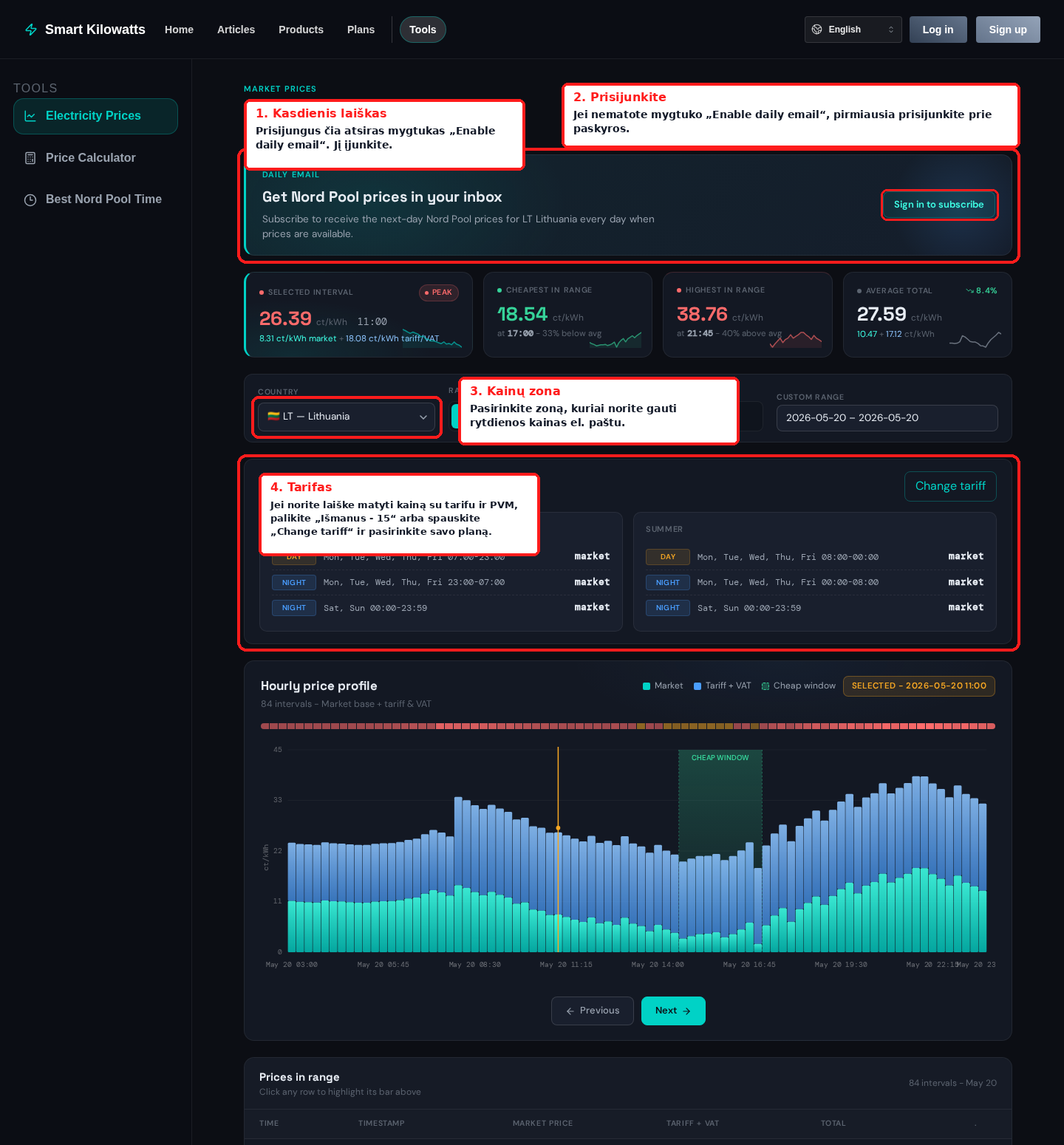
The fastest path is to open the electricity prices tool with the Ismanus - 15 tariff example. This address already selects a tariff example for the LT area, so you can immediately see what the total price with tariff and VAT would look like.
To make sure daily emails reach your inbox, the key settings are in the same tool:
- Check the price area. In the Country field, choose the Nord Pool area for which you want to receive tomorrow's prices. For Lithuanian users this is usually LT - Lithuania.
- Choose a tariff. If the example Ismanus - 15 (Enefit LT) tariff suits you, you can leave it selected. If you have another plan, press Change tariff and choose or enter your own tariff. This is needed only if you want the email to show not only the exchange price, but also the price with tariff and VAT.
- Sign in to your account. If you see Sign in to subscribe in the block, first sign in or create an account. The email must be linked to an account so the subscription can be turned off or changed later.
- Enable the daily email. After signing in, the same Daily email block will show an Enable daily email button. When you press it, the system will save the selected price area and start sending tomorrow-price emails after the prices have been published.
- Choose whether to show the final price in the email. After signing in, next to the subscription you will see the option Include tariff and VAT totals when available. Turn it on if you want the email to show prices with tariff and VAT; turn it off if the Nord Pool exchange price is enough.
After saving, emails will go to your account email address. You can turn off the subscription at any time in the same electricity prices tool, in account settings, or by clicking the unsubscribe link in the email itself.
If you do not yet have a Smart Kilowatts dongle or controlled devices, the email will still work: it will show tomorrow's cheapest window, daily average, peak, and hourly chart. When you later add a dongle and controlled devices, the same email will also include an additional monthly consumption summary and planned Smart Rules windows.
Related setups
-
Subscribe to Nord Pool prices
Opens the electricity prices tool with the Ismanus - 15 tariff example and the daily email block.
- View electricity prices
- View the Smart Kilowatts dongle